
PRACTICE NEWS & UPDATES

Alert – Phishing Email
New – My Health App
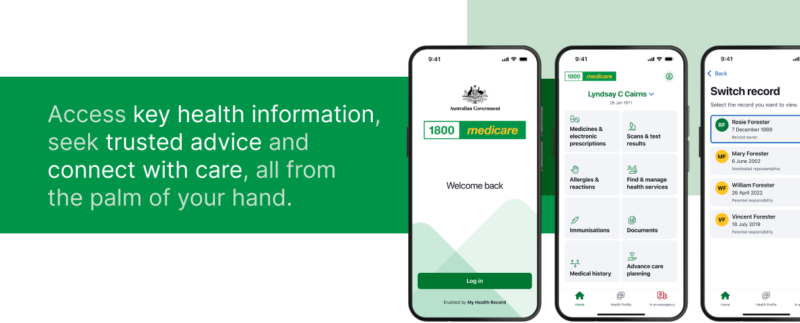
My health is a secure and convenient way to view key health information that you, your healthcare providers or representatives have uploaded to My Health Record. It also gives you access to electronic prescriptions and your Active Script List and has other great features like find and book a health service, and much more.
It’s fast, easy, and secure – and you can access and share it all from the palm of your hand.
Available for mobile and tablet.
Get started with my health
You will need:
- a myGov account linked to My Health Record and
- to have accessed My Health Record at least once through a web browser.
- Note: If you already have a myGov account, you don’t need to create a new one. To learn how to link a myGov account to My Health Record, see Step 1 on the Set up your record online page.
Then follow these simple steps:
Download my health from your app store. Search for “1800Medicare” in the Apple App Store or Google Play Store.
Open the app, select Get Started and follow the prompts.
Start exploring!
Click Here for more information
Cyber Security
Cyber Security Awareness
Now is the time for all Australians to take action to improve their cyber security.
Help build a cyber safe culture
We encourage you to prioritise cyber security by taking these 3 key actions:
- Install software updates to keep your devices secure.
- Use a unique and strong passphrase on every account.
- Always set up multi-factor authentication.
Further resources for the general community are available at actnowstaysecure.gov.au/cybermonth2025.
Scam Alert
SCAM ALERT ⚠️
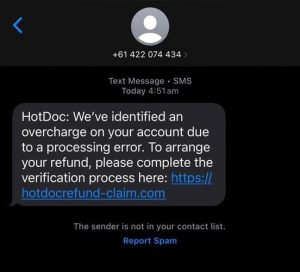
We have been made aware that scammers are posing as HotDoc and may send an SMS text message indicating that they have identified an overcharge on your account due to a processing error, to click a link to arrange a refund after completing a verification process.
If you receive this message, please DO NOT CLICK the link.
In some reports, scammers are impersonating others through SMS, email or phone calls in an attempt to phish and obtain your phone number or email address from various sources and often pose as representatives from large companies or medical clinics.
Things to remember:
👉🏽 Make sure that HotDoc tells you a few things that only they would know, for example: your name, the practice or GP name, the appointment details or information that would be secret and only shared between the practice and HotDoc directly
👉🏽 HotDoc will never call you
👉🏽 HotDoc will only SMS from 0409 593 783
👉🏽 all HotDoc links will only come from / direct you to hotdoc.com, hotdoc.com.au or hotdoc.io however CHECK THAT THE SPELLING is perfect and matches these exactly with no additions
If you have received a SMS as part of this scam, you can assist in reporting the phishing SMS to 0429 999 888 (free service by the ACMA — Australian Communications and Media Authority).
This service helps identify and block malicious numbers and domains.

MyMedicare is a new patient registration model in Australia. It aims to strengthen the relationship between patients, their general practice, general practitioner (GP) and primary care teams.
Patients who register for MyMedicare will have access to a range of benefits and may be able to access a range of extra services. You will be able to access these services only by registering your preferred clinic with Medicare.
Registration is free and optional.
Overall MyMedicare can improve the quality and efficiency of healthcare:
- Improved access to healthcare: MyMedicare can help patients to connect with their GP and other healthcare providers more easily and efficiently.
- Better coordination of care: MyMedicare can help to improve the coordination of care between different healthcare providers, which can lead to better outcomes for patients.
- More personalized care: MyMedicare can help healthcare providers to provide more personalized care to patients by giving them access to more information about their patients’ medical history.
- Increased patient engagement: MyMedicare can help patients to become more engaged in their own healthcare by giving them more control over their Medicare information and the ability to communicate with their healthcare providers more easily.
How to Register
- Medicare Online Account or Express Plus Medicare Mobile app.
- In-Person at the practice
-
- Fill out a registration form at reception. By signing the form, you are giving consent to our medical centre staff to register you in MyMedicare. Our practice staff will then complete the registration in the MyMedicare system for you.
AI Transcription
Your doctor may use an AI transcription tool to assist with creating clinical notes during consultations.
This supports your doctor in providing patient focussed care and does not replace your doctors clinical judgement or treatment.
If you have any further questions regarding the use of this technology, please speak with your doctor.
Further information is available from our Privacy Policy or at HeidiHealth.
COVID19 – Important Information
COVID19 Patient safety and the safety of our staff is paramount. We have implemented a number of strategies including, but not limited to frequent cleaning, providing hand sanitizer as well as implementing strict social distancing rules.
With safety in mind, during your visit please:
- Wear a mask whenever tolerated – Masks are recommended but not mandatory.
- Do your best to maintain 1.5 meters social distancing at all times
- If you have ANY cold or flu symptoms:
- Call ahead and one of our helpful staff can arrange a telehealth appointment (fees may apply)
- A discussion with the doctor about your symptoms will take place before your appointment confirmation
In line with NSW Government regulations we have limited the number of people in waiting area. Where possible, patients only to enter the practice (essential dependants and carers are excepted).